
Scheduling and billing for staffing, events and trades
KJUNA Dispatch that adds up.
Who drives which van to which site tomorrow, and are they even cleared for the job? KJUNA checks that while you plan, then carries the job through to the e-invoice. In the browser, on servers in Germany.
Who KJUNA is built for
KJUNA is designed for staffing agencies with workers deployed at client sites and for event service companies that send crews with vehicles and gear to trade fairs, tours and stage builds. KJUNA is equally suited to trade businesses whose teams work on changing job sites with vehicles and materials. Such businesses often operate within a group of several companies, and KJUNA is built for that too.
What they share is a daily reality in which staff, certificates, vehicles and dates must line up across many sites at once. That is exactly what KJUNA was developed for.
The system at a glance
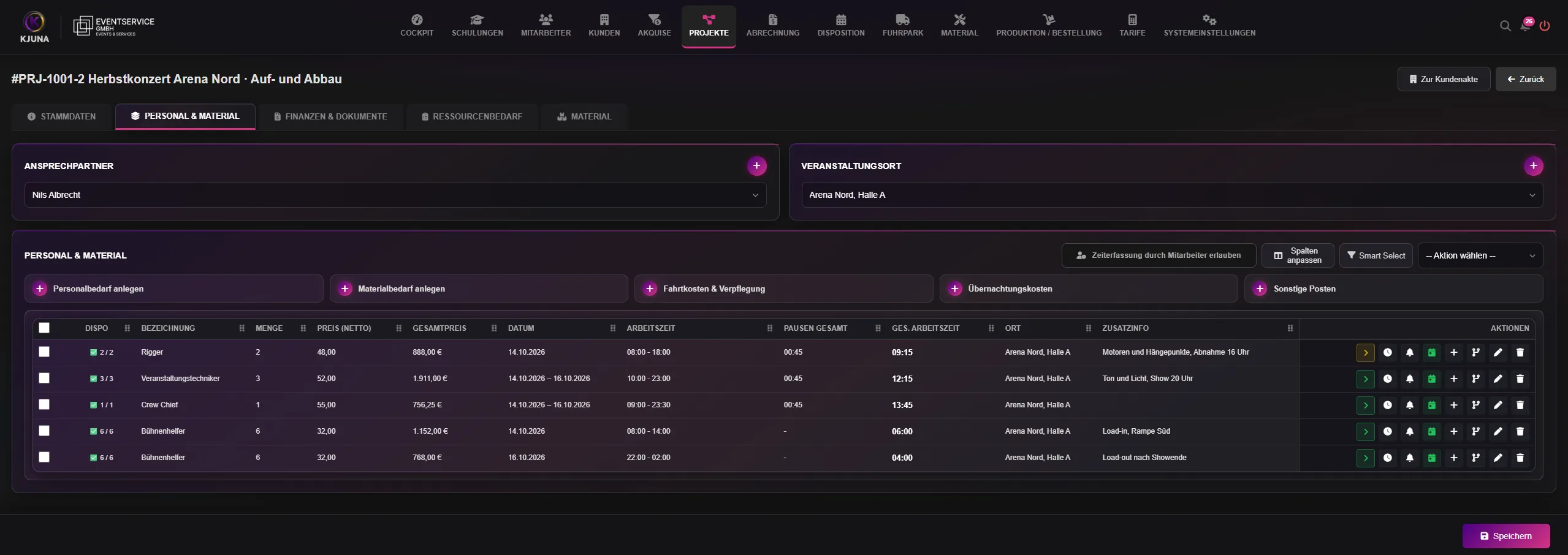
Projects, job scheduling and billing share a single data foundation in KJUNA. The requirements you define on a project are dispatched and carried onto the invoice as line items, with no re-keying.
- Planning
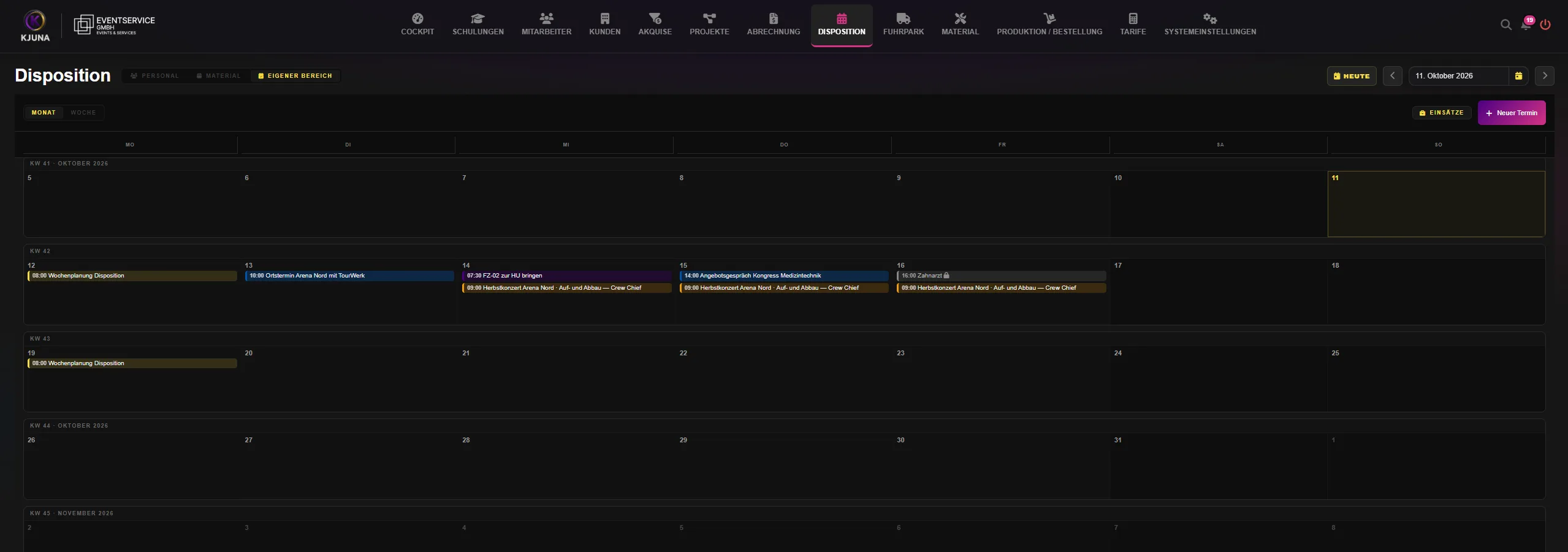
- Dispatch, projects with staffing and material requirements, calendar sync with Google, Microsoft and Apple
- Workforce
- Personnel files, qualifications with expiry dates, protective equipment, training with a learning platform, applicants
- Customers
- Customer records, sales pipeline with leads, quotes
- Operations
- Fleet, materials, production and supplier orders, documents with digital signing
- Billing
- Tariffs and surcharges, invoices as ZUGFeRD or XRechnung, dunning, time tracking and payroll prep with DATEV export
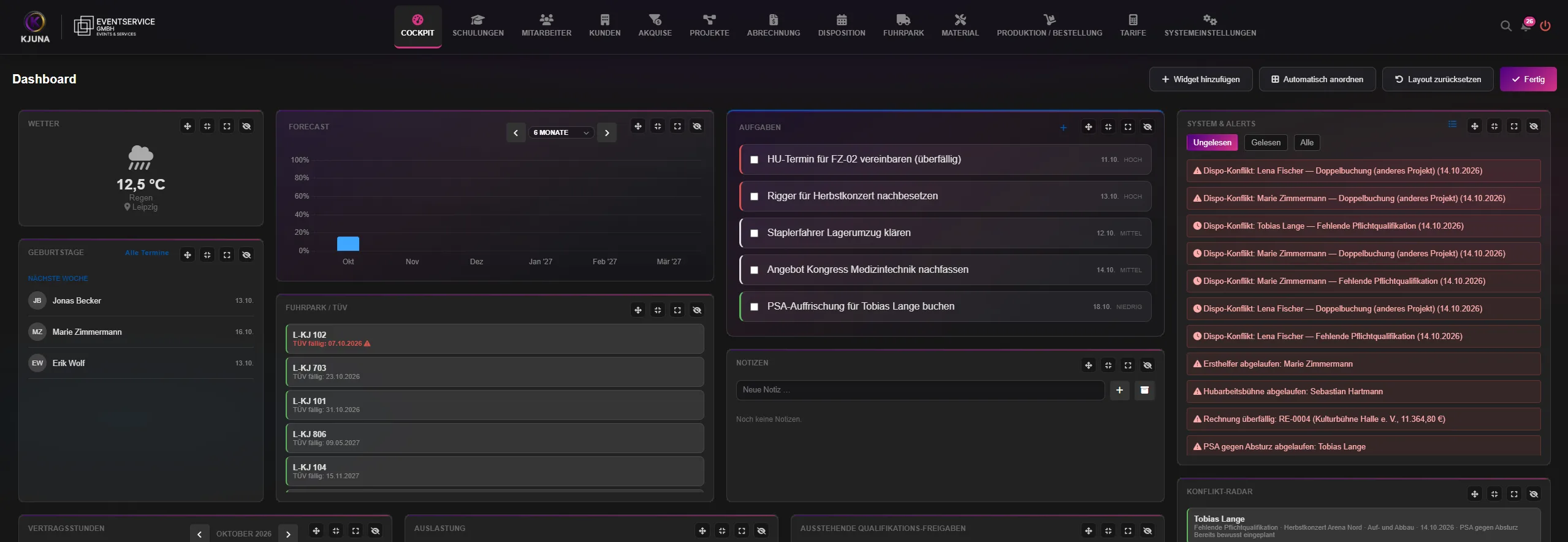
After sign-in, the cockpit brings together everything that needs action: dispatch conflicts, expired certificates, overdue invoices, upcoming fleet inspections and open tasks. Each user builds their own view from the available tiles.
Dispatch: checked before anyone heads out
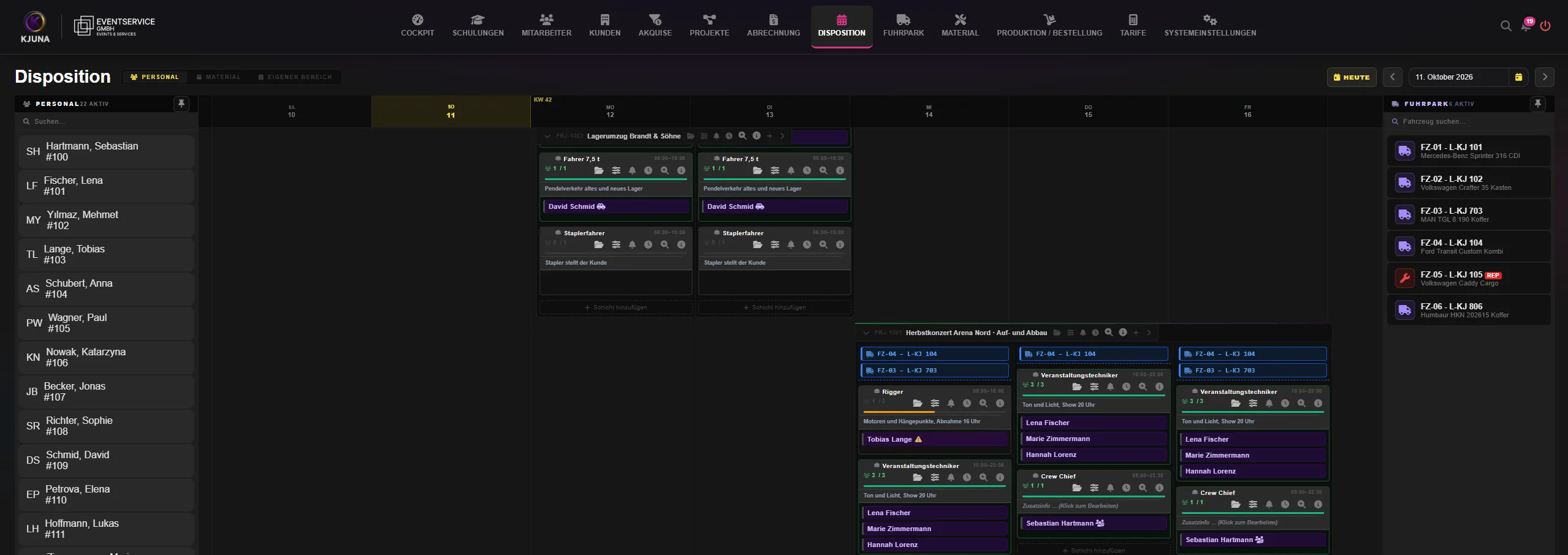
Staff, jobs and vehicles are planned on a single shared board. KJUNA checks every assignment the moment it is made.
You define which qualifications each role requires. If a certificate is missing or has expired, KJUNA blocks the assignment. Exceptions are possible, but they require explicit permission and remain clearly flagged.
On top of that, a nightly check reviews all upcoming jobs across all companies and branches. This also catches certificates that expired after the job was planned. The results appear in the cockpit's conflict radar.
- Required qualification missing or expiredThe assignment is blocked. An exception requires a dedicated permission.
- Person already bookedSame day, on another project or at one of your other companies. KJUNA flags the conflict, and a double booking has to be confirmed explicitly.
- Vehicle double-bookedKJUNA flags double-booked vehicles just as it does double-booked staff.
- Absent or otherwise busyRecorded absences and busy times from a connected calendar show up as “unavailable”.
Personnel files with deadline control
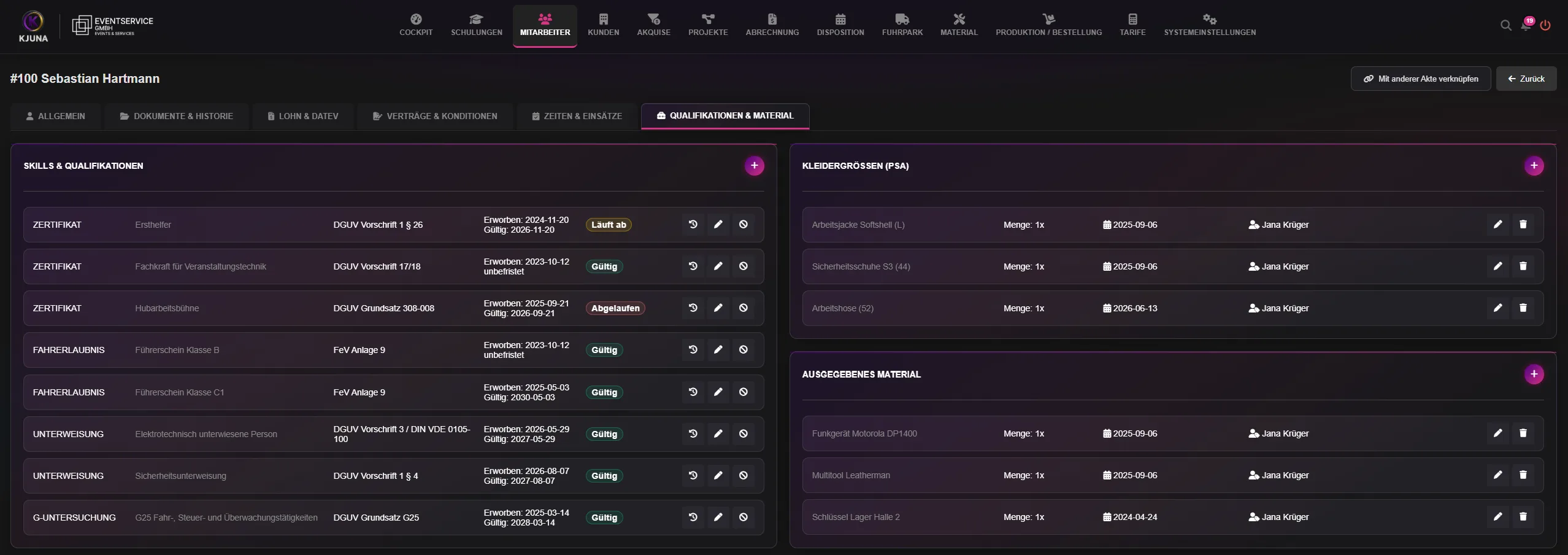
The personnel file brings all employee data together in one place, from master data and contracts through payroll and DATEV to deployments, qualifications and issued equipment. Dispatch works directly from this data.
Deadlines are at the core. KJUNA flags expiring certificates early, well before they turn into a block in dispatch. A nightly run keeps the status current, even if nobody opens the file.
The issue of protective gear is documented as well: who received which item, in which size, and when.
- QualificationsDate obtained, expiry and status: valid, expiring, expired. Revoked certificates stay in the history together with the reason.
- Protective gear and equipmentClothing sizes, items issued with their date, and the equipment an employee currently holds.
- TrainingCourses on the integrated learning platform. When a course falls due, KJUNA sends an automatic reminder.
- ApplicantsA file of their own, with stages from application through interview and offer to hiring or placement.
Fleet and documents
Fleet and equipment
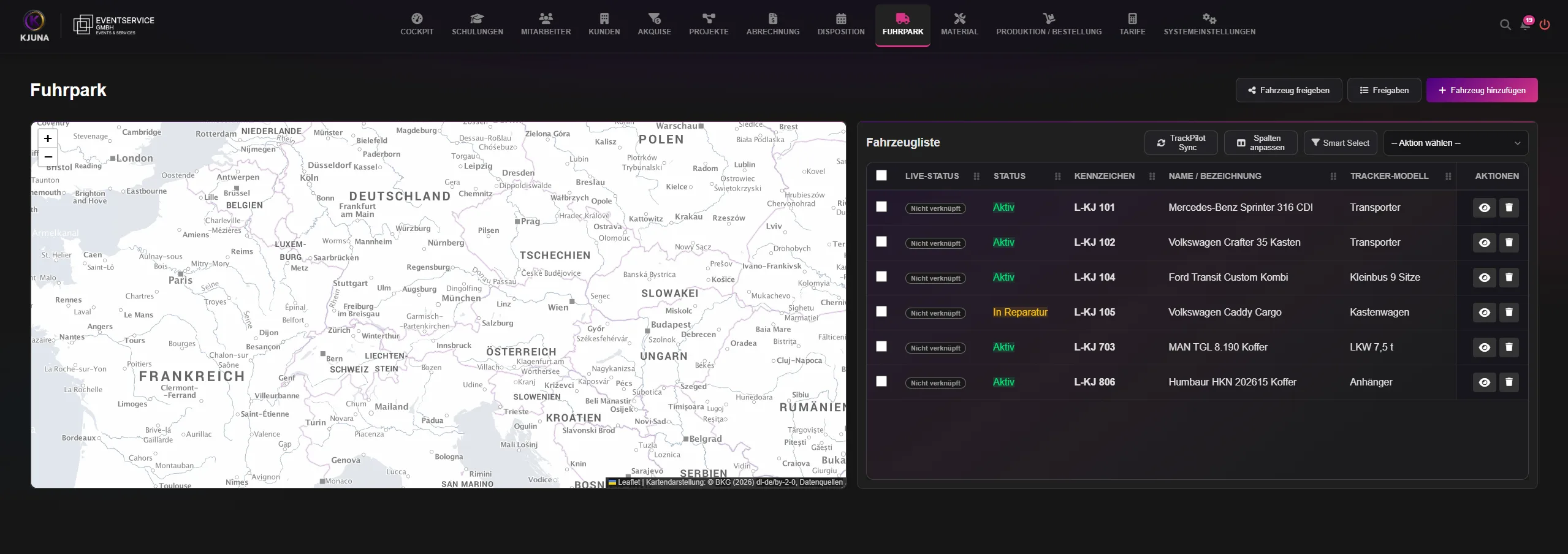
Each vehicle has its own record with dates for the statutory roadworthiness inspection (HU) and the accident-prevention check (UVV), including lead times. When a date approaches or is overdue, KJUNA flags it automatically. Services are scheduled by date or mileage.
Equipment is managed with stock levels and issue to employees. Reorders and production jobs run through production and ordering to your suppliers.
Documents and signatures
KJUNA generates contracts and project documents from your templates and fills them with data from the personnel file and the project. Invoices can carry your letterhead.
For signing, the recipient receives a link. No account is needed: they verify themselves with a code sent by email and sign directly in the browser. If a document is still unsigned after five days, KJUNA automatically reminds the recipient by email. The interval can be adjusted.
For every signed document, KJUNA creates a printable signature record with SHA-256 checksums for each version, from the original through approval to the signed copy. Legally, this is a simple electronic signature. It is suitable for all documents without a statutory written-form requirement, such as job confirmations or framework agreements. Documents that require written form under German law, such as fixed-term employment contracts or terminations, are signed on paper as usual.
From job to invoice
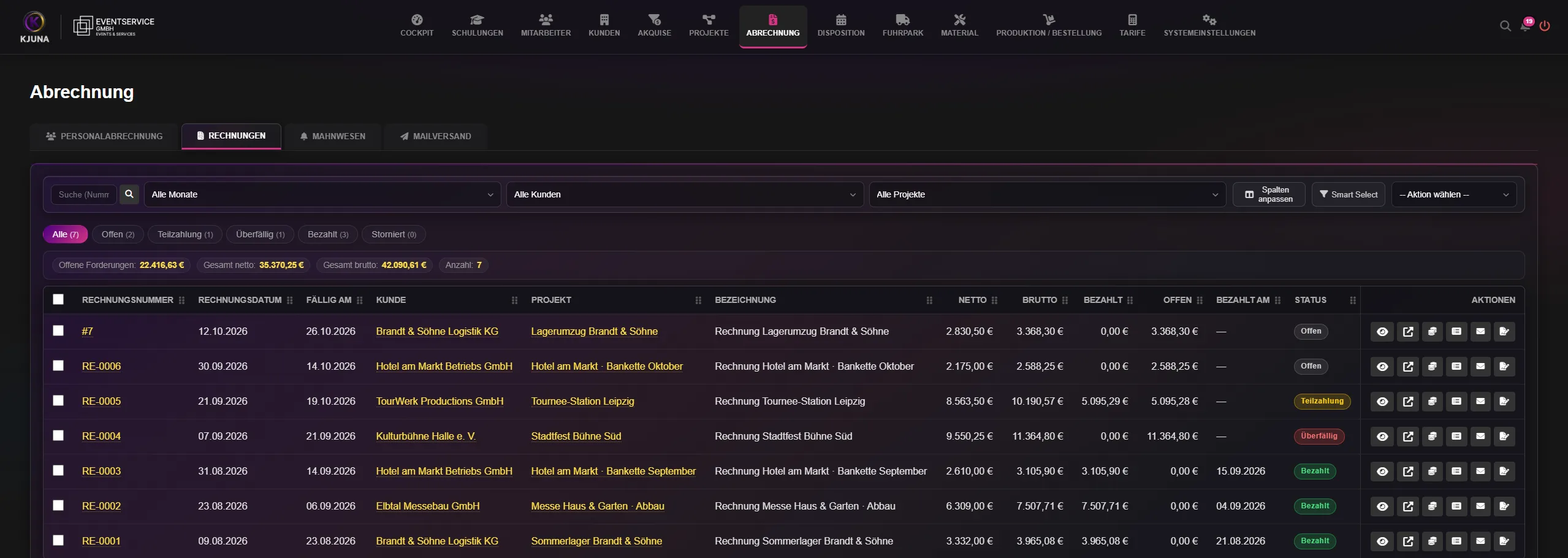
Every invoice is based on the project requirements. The entire process through to payment runs in four steps within KJUNA.
- Project and requirementsRoles, times and rates are captured on the project. Lines from a quote can be carried over.
- Tariffs and surchargesKJUNA calculates night, Sunday and public-holiday surcharges to the minute. Where they overlap, the highest surcharge applies, so nothing is ever charged twice. You maintain public holidays per country or state yourself.
- InvoiceFirst a preview as PDF and Word, then finalization, when KJUNA assigns the invoice number. The output is a PDF with embedded ZUGFeRD data (EN 16931 profile) or an XRechnung 3 XML file.
- Payment and dunningOpen, part-paid and overdue invoices are shown in one list. Dunning runs from a payment reminder through the first to the second dunning notice. You set the interval between stages, and notices are sent by email directly from KJUNA.
Payroll preparation for DATEV
Payroll itself is run in DATEV. KJUNA provides the groundwork: working hours per job and employee including breaks, corrections, a working-time account and a locked closing month. The movement data goes to DATEV in LODAS format, and your payroll office or tax adviser continues to work with it as usual.
Several companies, one login
Manage multiple companies and their branches in a single KJUNA account. You switch between companies and branches from the header, without signing in again.
Separation is maintained throughout. Each company has its own projects and customers, and permissions are granted per branch or for the whole company. A user who dispatches for one company can be limited to read access at another.
- Linked personnel filesIf someone works for two of your companies, both files are linked. If the person is already booked at one company, KJUNA warns the other against a double booking.
- Shared vehicles and equipmentA vehicle can be released to one of your other companies, optionally with the right to schedule it there. Equipment can be released the same way.
- One personal calendarYour appointments from every company you have access to, in one shared calendar.
Calendar connection: Google, Microsoft, Apple
Every user can connect their own calendar in the settings: Google Calendar, Outlook or Microsoft 365, or Apple Calendar via iCloud. The connection is set up exclusively by the user and applies to them alone.
- What KJUNA writes
- Your jobs from dispatch as all-day events with project name and role, plus any absences recorded for you. Your schedule is with you on your smartphone wherever you are.
- What KJUNA reads
- Your events from 30 days back to 180 days ahead. In dispatch they only show up as “unavailable”, with no title and no content. Whoever schedules you can see that you're busy, but not what with.
- “Busy only” mode
- KJUNA then takes nothing but the start and end of your events. Titles and descriptions stay in your calendar. “Full mirror” is active by default, and you can switch modes in settings at any time.
- Credentials
- Stored encrypted (AES-256-GCM) in your company's database and never passed to the user interface.
- Disconnecting
- Any time, in settings. The credentials are deleted immediately, and KJUNA stops reading and writing. You can also revoke access in your Google or Microsoft account.
- Sign-in
- With Google and Microsoft, you sign in directly with the provider, and KJUNA never receives your password. For Apple, you use an app-specific password for your Apple ID.
Calendar data is not sold and is not used for advertising or to train AI models. The details, including Google's and Microsoft's requirements, are in the privacy policy.
Within KJUNA, every user also has a calendar of their own. If their login is linked to their personnel file, it shows their own jobs and absences from dispatch alongside their appointments.
Where your data lives
Every customer receives a dedicated database and dedicated file storage. Your personnel data never shares a table with other companies' data.
KJUNA is operated on Hetzner servers in the Falkenstein data center in Saxony, Germany. The nightly backups are stored there as well.
KJUNA runs in the browser at a dedicated address for your company. No installation is required, and we roll out updates centrally.
Contact
Briefly describe how you plan today and which tools you use. We will get back to you by email.
Alpha phase
For the alpha phase, we are looking for selected companies that will run KJUNA in live operations and help shape its further development with their experience. The alpha runs for three months and is free of charge. In a monthly call, we discuss what works well and where you see further needs. If you continue afterwards, you receive preferential terms.
The number of places is limited. If you are interested, simply mention it in your message.
Prefer not to use the form? Write directly to info@kjuna.de.